Showing posts with label networking. Show all posts

Wednesday, April 2, 2014

Using files in clive

This is just a few snaps from a clive shell, a more detailed description or TR will follow...

List the ns (two trees mounted at /zx/abin, and /zx/xbin, nothing else mounted)

> ns
/ 0
/zx/abin 1
"" path:"/zx/abin" mode:"020000000755" type:"d" size:"3" name:"/" mtime:"1396356469000000000" addr:"tcp!Atlantis.local!8002!abin" proto:"zx finder" gc:"y"
/zx/xbin 1
"" path:"/zx/xbin" mode:"020000000755" type:"d" size:"1" name:"/" mtime:"1396356453000000000" addr:"tcp!Atlantis.local!8002!xbin" proto:"zx finder" gc:"y"

List just files at /zx

> l -l /zx
d-rwxrwx--- /zx/abin 3 01 Apr 14 14:47 CEST
d-rwxrwx--- /zx/xbin 1 01 Apr 14 14:47 CEST

List all files under / with mode 750

> l -l /,mode=0750
- 0-rwxr-x--- /zx/xbin/bin/Go 202 01 Apr 14 14:47 CEST
- 0-rwxr-x--- /zx/xbin/bin/Watch 2351948 01 Apr 14 14:47 CEST
- 0-rwxr-x--- /zx/xbin/bin/a 212 01 Apr 14 14:47 CEST
- 0-rwxr-x--- /zx/xbin/bin/cgo 2452606 01 Apr 14 14:47 CEST
- 0-rwxr-x--- /zx/xbin/bin/drawterm 837032 01 Apr 14 14:47 CEST
- 0-rwxr-x--- /zx/xbin/bin/drawterm.old 843880 01 Apr 14 14:47 CEST
- 0-rwxr-x--- /zx/xbin/bin/dt 60 01 Apr 14 14:47 CEST
- 0-rwxr-x--- /zx/xbin/bin/ebnflint 1149721 01 Apr 14 14:47 CEST
- 0-rwxr-x--- /zx/xbin/bin/gacc 32 01 Apr 14 14:47 CEST
- 0-rwxr-x--- /zx/xbin/bin/gnot 52 01 Apr 14 14:47 CEST
- 0-rwxr-x--- /zx/xbin/bin/hgpatch 1328046 01 Apr 14 14:47 CEST
- 0-rwxr-x--- /zx/xbin/bin/mango-doc 2957328 01 Apr 14 14:47 CEST
- 0-rwxr-x--- /zx/xbin/bin/nix 60 01 Apr 14 14:47 CEST
- 0-rwxr-x--- /zx/xbin/bin/quietgcc 1326 01 Apr 14 14:47 CEST
- 0-rwxr-x--- /zx/xbin/bin/t+ 23 01 Apr 14 14:47 CEST
- 0-rwxr-x--- /zx/xbin/bin/t- 22 01 Apr 14 14:47 CEST

Then chmod all of them to mode 755
> l -a /,mode=0750 | chmod 0755

How did chmod find out the files?
Here's how
> zl -a /zx
tcp!Atlantis.local!8002!abin /
tcp!Atlantis.local!8002!xbin /

The interesting thing is that the names are separated from the files (i.e., a file server serves a finder interface to find out about directory entries, and then a file tree to serve operations on those entries).

Commands operate on finders to discover entries, and then use them to reach the servers and perform operations on them. Of course, connections to servers are cached so that we don't create a new one per directory entry, which would be silly.

All these requests are streamed through channels, as are the replies, so that you can do things like this:
dc := sh.files(true, args...)
n := 0
for d := range dc {
n++
// we could process +-rwx here using d["mode"] to
// build the new mode and then use just that one.
nd := zx.Dir{"mode": mode}
ec := rfs.Dir(d).Wstat(nd)
<-ec
err := cerror(ec)
if err != nil {
fmt.Printf("%s: %s\n", d["path"], err)
}
}


Here, the code is waiting for one reply at a time, but it could easily stream 50 at a time like another command does:

calls := make(chan chan error, 50)
for i := len(ents)-1; i >=0; i-- {
ec := rfs.Dir(ents[i]).Remove()
select {
case calls <- ec:
case one := <-calls:
<-one
err := cerror(one)
if err != nil {
fmt.Printf("%s\n", err)
}
}
}


Tuesday, March 11, 2014

Network servers in Clive

The TR draft kept at TR describes, including some code excerpts how network services are built leveraging the tools described in the previous posts (and the TRs they mention).

In short, it is very easy to build services in a CSP like world while, at the same time, those services may be supplied across the network. And that considers also a set of pipes, or fifos, as a network!. It is not just TCP.

This is a teaser:

func (s *Srv) put(m *Msg, c <-chan []byte, rc chan<- []byte) {
wt, ok := s.t.(zx.RWTree)
if !ok {
close(rc, "not a rw tree")
return
}
err := wt.Put(m.Rid, m.D, c)
close(rc, err)
}

And this is another:

cc, err := Dial("fifo!*!ftest", nil)
if err != nil {
t.Fatal(err)
}
for i := 0; i < 10; i++ {
cc.Out <- []byte(fmt.Sprintf("<%d>", i))
msg := string(<-cc.In)
printf("got %s back\n", msg)
}
close(cc.In)
close(cc.Out)

Files and name spaces meet channels in Clive

This is the third post on a series of posts describing what we did as part of the ongoing effort to build a new OS, which we just named as "Clive". The previous two posts described how channels were used and bridged to the outside pipes and connections, and how they where multiplexed to make it easy to write protocols in a CSP style.

This post describes what we did regarding file trees and name spaces. This won't be a surprise considering that we come from the Plan 9, Inferno, Plan B, NIX, and Octopus heritage.

But first things last. Yes, last. A name space is separated from the conventional file tree abstraction. That is, name spaces exist on their own and map prefixes to directory entries.  A name space is searched using this interface

type Finder interface {
Find(path, pred string, depth0 int) <-chan zx.Dir
}

The only operation lets the caller find a stream of matching directory entries for the request.
Directory entries are within the subtree rooted at the given path, and must match the supplied predicate.

A predicate here is a very powerful thing, inspired by the unix command named before our operation.
For example,  the predicate

~ name "*.[ch]" & depth < 3
can be used to find files with names matching C source file names but no deeper than three
levels counting from the path given.

It is also important to notice that the results are delivered through a channel. This means that the operation may be issued, reach a name space at the other end of the network, and the caller may just retrieve the stream of replies when desired (or pass the stream to another process).

Things like removing all object files within a subtree can now be done in a couple of calls. One to find the stream of entries, and another to convert that stream into a stream of remove requests.

And here is where the first thing (deferred until now) comes. The interface for a file tree to be used across the network relies on channels (as promises) to retrieve the result of each operation requested. Furthermore, those channels are buffered in many cases (eg., on all error indications) and might be even ignored if the caller is going to checkout later the status of the entire request in some other way.

Thus, we can actually stream the series of removes in this example. Note that the call to remove simply issues the call and returns a channel that can be used to receive the reply later on.

oc := ns.Find("/a/b", "~ name *.[ch] & depth < 3", 0)
for d := range oc {
fs.Remove(d["path"]) // and ignore the error channel
}

This is just an example. A realistic case would not ignore the error channel returned by
the call to remove. It would probably defer the check until later, or pass the channel to another process checking out that removes were made. 

Nevertheless, the example gives a glance of the power of file system interfaces used in Clive.
Reading and Writing is also made relying on input and output channels.

If you are interested in more details, you can read zx, which describes the file system and name space interfaces, and perhaps also nchan, which describes CSP like tools used in Clive and important to understand how these interfaces are used in practice.

Channels, pipes, connections, and multiplexors

This post is the second in a series to describe how we adapted the CSP style of programming used in Go to the use of external pipes, files, network connections, and related artefacts.
This was the first post. In what follows we refer as "pipe" to any external file-descriptor-like artefact used to reach the external world (for input or output).


Connections
The nchan package defines a connection as

 type Conn struct {
  Tag string // debug
  In  <-chan []byte
  Out chan<- []byte
 }

This joins two channels to make a full-duplex connection. A process talking to an external entity relies on this structure to bridge the system pipe used to a pair of channels. There are utilies that leverage the func- tions described in the previous section and build a channel interface to external pipes, for example:

 func NewConn(rw io.ReadWriteCloser, nbuf int, win, wout chan bool) Conn

The function creates processes to feed and drain the connection channels from and to the external pipe. Fur- thermore, if rw supports closing only for reading or writing, a close on the input or output channels would close the respective halves of the pipe. Because of the message protocol explained in the previous section, errors are also propagated across the external pipe and the process using the connection can very much ignore that the source/sink of data is external.
It is easy to build pipes where the Out channel sends elements through the In channel:

        func NewPipe(nbuf int) Conn

And, using this, we can create in-memory connections that do not leave the process space:

 func NewConnPipe(nbuf int) (Conn, Conn)

This has been very useful during testing, because this connection can be created with no buffering and it is easier to spot dead-locks that involve both ends of the connection. Once the program is ready, we can replace the connection based pipe with an actual system provided pipe.

Multiplexors
Upon the channel based connections shown in the previous sections, the nchan package provides multiplex- ors.

 type Mux struct {
  In chan Conn
  ...
 }
 func NewMux(c Conn, iscaller bool) *Mux
 func (m *Mux) Close(err error)
 func (m *Mux) Out() chan<- []byte
 func (m *Mux) Rpc() (outc chan<- []byte, repc <-chan []byte)

A program speaking a protocol usually creates a new Conn connection by dialing or accepting connections and then creates a Mux by calling NewMux to multiplex the connection among multiple requests.


The nice thing of the multiplexed connection is that requests may carry a series of messages (and not just one message per request) and may or not have replies. Replies may also be a full series of messages. Both ends of a multiplexed connetion (the process using the mux and its peer at the other end of the pipe) may issue requests. Thus, this is not a client-server interaction model, although it may be used as such.
To issue new outgoing requests through the multiplexor, the process calls Out (to issue requests with no expected reply):

 oc := mux.Out()
 oc <- []byte("no reply")
 oc <- []byte("expected")
 close(oc)

Or the process may call Rpc (to issue requests with an expected reply).

 rc, rr := mux.Rpc()
 rc <- []byte("another")
 rc <- []byte("request")
 close(rc)
 for m := range rr {
  Printf("got %v as part of the reply\en", m)
 }
 Printf("and the final error status is %v\en", cerror(rr))

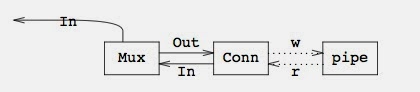
In the first case, the multiplexor returns a Conn to the caller with just the Out channel. Of course, this can be done multiple times to issue several concurrent outgoing requests:


In the figure, the two connections of the left were built by two calls to mux.Out(), which returns a Conn with an Out chan to issue requests. The process using the Out channel may issue as many messages as desired and then close the channel.
If the request depicted below requires a reply, mux.Rpc() is be called finstead of mux.Out() and the resulting picture is as shown.


The important part is that messages (and replies) sent as part of a request (or reply) may be streamed with- out affecting other requests and replies, other than by the usage of the underlying connection. That is, an idle stream does not block other streams.
The interface for the receiving part of the multiplexor is a single In channel that conveys one Conn per incoming request. The request has only the In channel if no reply is expected, and has both the In and Out channels set if a reply is expected.


To receive requests from the other end of the pipe, the code might look like this:

for call := range mux.In {
// call is a Conn
for m := range call.In {
Printf("got %v as part of the request\en", m)
}
if call.Out != nil {
call.Out <- []byte("a reply")
call.Out <- []byte("was expected, but...")
close(call.Out, "Oops!, failed")
}
}


For example, if a process received two requests, one with no reply expected and another with a reply expected, the picture would be:


Here, the two connections on the left represent requests that were received through the In channel depicted on top of the multiplexor.

The important thing to note is that processes may now issue streams of requests, or replies, through channels and they are fed to external pipes (or from them) as required. The interfaces shown have greatly simplified programming for (networked) system serviced being written for the new system.


Monday, March 10, 2014

Channels and pipes: close and errors

This post describes changes made to Go channels and tools built upon those to provide system and network-wide services for a new OS under construction. Further posts will follow and describe other related set of tools, but the post is already long enough. Yes, belts are gone, we use our modified channels directly now.

A channel is an artifact that can be used to send (typed) data through it. The Go language operations on channels include sending, receiving, and selection among a set of send and receive operations. Go permits also to close a channel after the last item has been sent.
On most systems, processes and applications talk through pipes, network connections, FIFOS, and related artifacts. In short, they are just file descriptors once open, permit the application to write data (for sending) and/or read data (for receiving). Some of these are duplex, but they can be considered to be a pair of devices (one for each direction). In what follows we will refer to all these artifacts as pipes (e.g., a net- work connection may be considered as a pair of simplex pipes).
There is a mismatch between channels and pipes and this paper shows what we did to try to bridge the gap between both abstractions for a new system. The aim is to let applications leverage the CSP style of programming while, at the same time, let them work across the network.
We assume that the reader is familiar with channels in the Go language, and describes only our modi- fications and additions.


Close and errors

When using pipes, each end of the pipe may close and the pipe implementation takes care of propagating the error to the other end. That is not the case with standard Go channels. Furthermore, upon errors, it is desirable for one end of the pipe to learn about the error that did happen at the other end.
We have modified the standard Go implementation to:
  1. 1  Accept an optional error argument to close.
  2. 2  Make the send operation return false when used on a closed channel (instead of panicing; the receive operation already behaves nicely the case of a closed channel).
  3. 3  Provide a primitive, cerror, that returns the error given when the channel was closed.
  4. 4  Make a close of an already closed channel a no-operation (instead of a panic).
With this modified tool in hand, it is feasible to write the following code:

var inc, outc chan[]byte
...
for data := range inc {
ndata := modify(data)
if ok := outc <-ndata; !ok {
close(inc, cerror(outc))
break
}
}
close(outc, cerror(inc))


Here, a process consumes data from inc and produces new data through outc for another one. The image to have in mind is


where the code shown corresponds to the middle process. Perhaps the first process terminates normally (or abnormally), in which case it would close inc. In this case, our code closes outc as expected. But this time, the error given by the first process is known to the second process, and it can even forward such error to the third one.
A more interesting case is when the third process decides to cease consuming data from outc and calls close. Now, our middle process will notice that ok becomes false when it tries to send more data, and can break its loop cleanly, closing also the input channel to singal to the first process that there is no point in producing further data. In this second example, the last call to close is a no-operation because the output channel was already closed, and we don’t need to add unnecessary code to prevent the call.
The important point is that termination of the data stream is easy to handle for the program without resorting to exceptions (or panics), and we know which one is the error, so we can take whatever measures are convenient in that case.


Channels and pipes
There are three big differences between channels and pipes (we are using pipe to refer to any ‘‘file descrip- tor’’ used to convey data, as stated before). One is that pipes may have errors when sending or receiving, but channels do not. Another one is that pipes carry ony streams of bytes and not separate messages. Yet another is that channels convey a data type but pipes convey just bytes.
The first difference is mostly dealt with the changes made to channels as described in the previous section. That is, channels may have errors while sending and or receiving, considered the changes made. Therefore, the code using a channel must consider errors in very much the same way it would do if using a pipe.
To address the third difference we are going to consider channels of byte arrays by now.
The second difference can be dealt with by ensuring that applications using channels to speak through a pipe preserve message boundaries within the pipe. With this in mind, a new nchan package pro- vides new channel tools to bridge the gap between the channel and the pipe domains.
The following function writes each message received from c into w as it arrives. If w preserves mes- sage boundaries, that is enough. The second function is its counterpart.

func WriteBytesTo(w io.Writer, c <-chan []byte) (int64, error)
func ReadBytesFrom(r io.Reader, c chan<- []byte) (int64, error)

 However, is most cases, the transport does not preserve message boundaries. Thus, the next function writes all messages received from c into w, but precedes each such write with a header indicating the message length. The second function can rely on this to read one message at a time and forward it to the given chan- nel.
  func WriteMsgsTo(w io.Writer, c <-chan []byte) (int64, error)
func ReadMsgsFrom(r io.Reader, c chan<- []byte) (int64, error)


One interesting feature of WriteMsgsTo and ReadMsgsFrom is that when the channel is closed, its error sta- tus is checked out and forwarded through the pipe. The other end notices that the message is an error indi- cation and closes the channel with said error.
Thus, code like the excerpt shown for our middle process in the stream of processes would work correctly even if the input channel comes from a pipe and not from a another process within the same program.

The the post in the series will be about channel connections and channel multiplexors.


Saturday, December 14, 2013

Go servers and clients using belts

In a previous post I described the new belt abstraction, something similar to a Go channel, but capable of propagating error information from producers to consumers and capable of notifying producers that the consumers are no longer interested on more data, so they could terminate gracefully.

In this post I describe an example server and client using belts.

First, the server.  This is the code from a a test of the net/srv package.
imsg := 0
smsg := ""
h := NewBeltConn(&imsg, &smsg)

// An echo server from inb to outb.
go func() {
inb := h.In
outb := h.Out
defer outb.Close()
for {
m, err := inb.Rcv()
if err == belt.ErrClosed {
break
}
if err != nil {
Printv("srv: err %v\n", err)
err = outb.Snd(err)
} else {
Printv("srv: msg %v\n", m)
err = outb.Snd(m)
}
if err != nil {
t.Fatalf("srv: send: %s", err)
}
}
}()

s := New("test", "8081", h)
if err := s.Serve(); err != nil {
t.Fatal(err)
}
Before looking at the different parts, just see how the echo server can simply keep on receiving from the input belt and can tell errors from the client apart from regular client data. In fact, we echo errors back to the client.
Furthermore, if at some point the server does not want to receive more data from the client, it would simply inb.Close()and that would cleanly stop the process reading from the underlying network connection and sending data to the input belt.

The function NewBeltConn is as follows:

func NewBeltConn(proto ...interface{}) BeltConn {
h := BeltConn{
In:  belt.New(),
Out: belt.New(),
}
h.In.SetProto(proto...)
h.Out.SetProto(proto...)
return h
}

It creates two belts, one for input and one for output. Furthermore, the concrete values given as arguments are used in SetProto to tell the belts which data types they should accept as valid conveyed values (besides errors, which are always valid).

The code 
s := New("test", "8081", h)
if err := s.Serve(); err != nil {
t.Fatal(err)
}
from the network server package creates a new server listening at the indicated port, named test. This server spawns two processes per client. One calls belt.PipeFrom to convey data from the network to the input server belt, and the other calls belt.PipeTo to convey messages sent to the output belt back to the network.

In the normal situation, when the client closes the connection, the PipeFrom process closes the input belt and the server loop notices, closing then the output belt, which leads to the server network connection (to the client) being closed.

In the abnormal situation that the server decides to stop, it may close its input belt (and not just its output belt) to cleanly stop the two auxiliary processes on the server side.

The nice thing is that the server code is exactly the same code that would be used if it were just echoing to the client within the same machine. Because errors are propagated along with data (a send on a channel won't fail, but a send on a network or a pipe might fail).

Going back to the client, it might be as follows. This one is also from the tests for the package.
// client: send an error and several int/string messages.
ch, err := DialBeltTCP("[::1]:8081", &imsg, &smsg)
if err != nil {
t.Fatal(err)
}
if err := ch.Out.Snd(errors.New("errmsg")); err != nil {
t.Fatalf("send: %s", err)
}
for i := 0; i < 10; i++ {
Printv("cli: send %v\n", i)

if i%2 == 0 {
if err := ch.Out.Snd("str"); err != nil {
t.Fatalf("send: %s", err)
}
continue
}
if err := ch.Out.Snd(i); err != nil {
t.Fatalf("send: %s", err)
}
}
ch.Out.Close()

The first line calls DialBeltTCP, which is a convenience function to dial a TCP address and link an input and output belt to the resulting connection. Like in the case of the server, it relies on a BeltConn and two processes using belt.PipeFrom and belt.PipeTo to relay between the belts and the connection.

The pointers to values following the dialled address specify the protocol for the belts, so they could check out which messages are sent as part of the protocol and could configure themselves to be able to marshal and un-marshal those. 

As expected, the client can send any of the types configured, plus error indications.
To receive replies, the client would simply call ch.In.Rcv, like shown here for sending.

The interesting bit is that,  considering the chain made out of "client sender", "pipe to network", "server pipe from network", server echo, "server pipe to network", "client pipe from network", "client receiver", if at any point one process decides to stop, it can close both its input and output and the entire chain is shutdown both to the left and to the right of the closing point, cleanly, without making the code more complex or adding extra channels to the mix.